Request A Demo
POWERED BY AGENTFORCE AI

Ask the Traffic Manager Agent for Help.

Don't Click 10 Times to Update.

Tell it what you need in plain language — create jobs, log time, reassign tasks — and it works inside Salesforce.  It's not a chatbot bolted onto the side of the app. It's how the app works.

Eight ways JobSuite works for your team, and counting.

inbox-icon

Job Mangement

Create jobs, import a batch from a spreadsheet, find jobs for a client, duplicate with child records, or mark jobs complete — all in plain language.
packaging-icon200px

Campaign Management

Find active campaigns, see which jobs are tied to one, filter by date range, or mark campaign jobs complete.
users-icon200px

Team Assignment

Add a team member to a job or reassign staff on a specific task, without digging through record edit screens.
add-item-icon100px

Status Notes

Update status notes after a production meeting or post directly to Chatter, with user tagging, without opening a single form.
checklist-icon100px

Task Management

Find tasks due today or past due, mark tasks complete by job or in bulk, see tasks by role, or reassign tasks.
shield-icon

File Review & Collaboration

Submit a file for review or create a Chatter post.
time-icon

Time & Scheduling

Log a timesheet entry, build a task schedule, or change a due date in seconds — just tell it what changed.
partnership-icon200px

Build Custom Agent Actions for Your Team

Standard actions won't cover every workflow. We build custom Agent actions around your team's specific challenges — from bulk status updates to turning timesheets into invoices.
BUILT WITH SALESFORCE AGENTFORCE
 

Tell Us What's Slowing You Down.

We'll Teach the Agent to Fix It.

Off-the-shelf tools hand you a fixed set of features and ask your team to adapt around them. JobSuite works the other way. Tell us what's actually slowing your team down, and we'll build the fix into your workflow — not a generic report or a canned feature, but something built around your problem.


We can customize the Agent to help your team with your specific challenges.

  • 200 Jobs, One Click

  • Timesheets to Invoices

  • Reassign Hundreds of Jobs

Batch of Jobs (4)

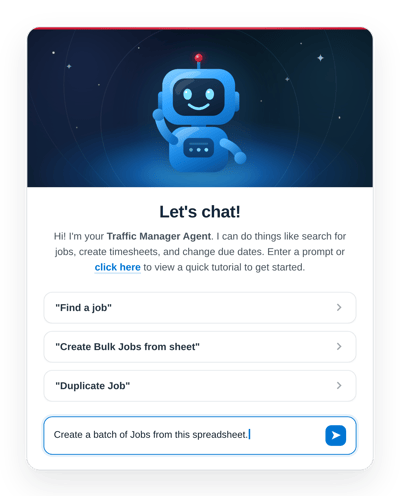
Launch 200 Jobs at Once

  • Marketing requests a creative ops team to build 200 jobs on the first of every month. It can take days to simply create the job records.
  • Now the Traffic Manager Agent handles it in plain language: "Create this month's menu update jobs from a spreadsheet."
  • Done in seconds, not hours.

Creat Invoices prompt (1)

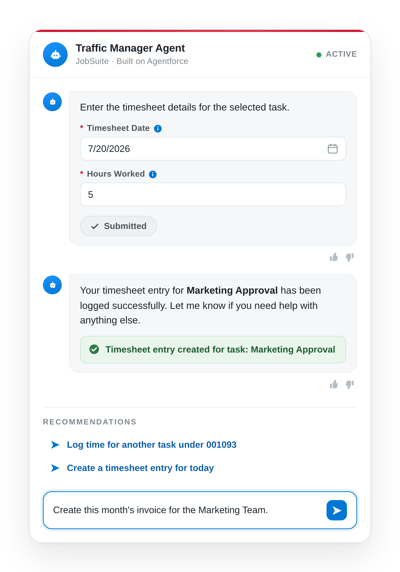
Turn Timesheets into Invoices, Automatically

  • Another team was manually rebuilding invoices from timesheet data every billing cycle.
  • We built an agent that turns logged time directly into finished invoices, no rekeying required.
  • Enter a prompt like: "Create this months invoice for the Marketing Team."

Change the Designer (1)

Change the Designer on All Jobs Under a Campaign

  • A creative team has multiple Campaigns, each Campaign has hundreds of jobs under it. The Designer assigned to a Campaign, and all of its Jobs, can change. When the designer changes mid-campaign, every one of those jobs needs to be reassigned.
  • We customized the Agent to reassign the designer across an entire campaign with a single natural language prompt.
  • Enter a prompt like: "Assign Tweety Bird to all jobs under the Fall 2026 campaign." Done in seconds, not hours.

Batch of Jobs (4)

Launch 200 Jobs at Once

  • Marketing requests a creative ops team to build 200 jobs on the first of every month. It can take days to simply create the job records.
  • Now the Traffic Manager Agent handles it in plain language: "Create this month's menu update jobs from a spreadsheet."
  • Done in seconds, not hours.

Creat Invoices prompt (1)

Turn Timesheets into Invoices, Automatically

  • Another team was manually rebuilding invoices from timesheet data every billing cycle.
  • We built an agent that turns logged time directly into finished invoices, no rekeying required.
  • Enter a prompt like: "Create this months invoice for the Marketing Team."

Change the Designer (1)

Change the Designer on All Jobs Under a Campaign

  • A creative team has multiple Campaigns, each Campaign has hundreds of jobs under it. The Designer assigned to a Campaign, and all of its Jobs, can change. When the designer changes mid-campaign, every one of those jobs needs to be reassigned.
  • We customized the Agent to reassign the designer across an entire campaign with a single natural language prompt.
  • Enter a prompt like: "Assign Tweety Bird to all jobs under the Fall 2026 campaign." Done in seconds, not hours.

REQUEST A DEMO

See the Traffic Manager Agent in Action

Fill out the form and one of our workflow consultants will reach out to get things rolling.